SMS TERMS AND CONSENT
SMS TERMS AND CONSENT
Version: 04152026
Last Updated: April 15, 2026
Email: support@gojobzen.com
Version: 04152026
Last Updated: April 15, 2026
Email: support@gojobzen.com
1. Campaign Overview
Jobzen is an on-demand home services marketplace operated by Homepro Network LLC, d/b/a Jobzen, a Utah-based company. Jobzen connects homeowners with vetted home service providers (contractors) via a mobile application.
SMS Use Cases: Two transactional use cases only:
One-time password (OTP) / phone verification codes sent to contractors who opt in to SMS authentication during or after onboarding.
Onboarding completion prompts — transactional SMS reminders sent to users who began registration but did not complete all required steps, prompting them to finish their profile. No promotional or marketing content is included in these messages.
SMS Opt-In is Optional: Phone verification via SMS is not required to use Jobzen. During contractor onboarding, users are given the choice to opt in to SMS or skip and set up phone verification later in their profile settings. Email authentication is always available as an alternative.
Message Type: Transactional — OTP / Account Verification and Onboarding Completion Prompts
Sender: Jobzen (Homepro Network LLC)
Platform: Twilio Programmable Messaging
Message Frequency: Varies. Typically 1–5 messages per week per user, triggered only by user authentication actions or incomplete onboarding status. Jobzen does not send scheduled batch or marketing messages.
1. Campaign Overview
Jobzen is an on-demand home services marketplace operated by Homepro Network LLC, d/b/a Jobzen, a Utah-based company. Jobzen connects homeowners with vetted home service providers (contractors) via a mobile application.
SMS Use Cases: Two transactional use cases only:
One-time password (OTP) / phone verification codes sent to contractors who opt in to SMS authentication during or after onboarding.
Onboarding completion prompts — transactional SMS reminders sent to users who began registration but did not complete all required steps, prompting them to finish their profile. No promotional or marketing content is included in these messages.
SMS Opt-In is Optional: Phone verification via SMS is not required to use Jobzen. During contractor onboarding, users are given the choice to opt in to SMS or skip and set up phone verification later in their profile settings. Email authentication is always available as an alternative.
Message Type: Transactional — OTP / Account Verification and Onboarding Completion Prompts
Sender: Jobzen (Homepro Network LLC)
Platform: Twilio Programmable Messaging
Message Frequency: Varies. Typically 1–5 messages per week per user, triggered only by user authentication actions or incomplete onboarding status. Jobzen does not send scheduled batch or marketing messages.
Consent Journey — Step by Step Opt in Flow
Contractor SMS opt-in occurs within a single continuous onboarding journey. The steps below are documented in the exact order a contractor experiences them in the onboarding experience. Contractors who do not opt in during onboarding may do so through a second flow in their Profile settings after onboarding is complete.
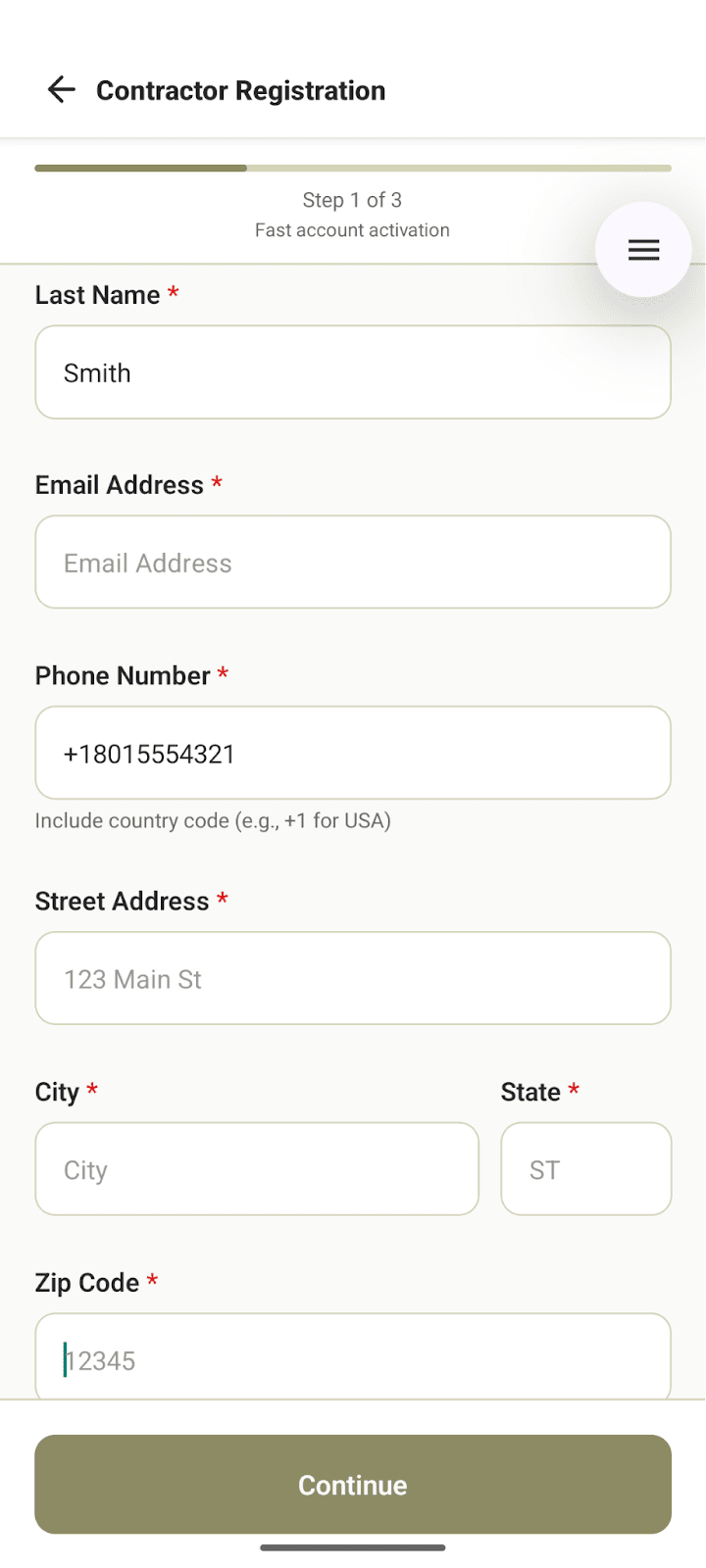
Flow A.1 — Contractor Registration Form: Phone Number Entry (Step 1 of 3)
The contractor begins registration on the “Contractor Registration” screen (Step 1 of 3, labeled “Fast account activation”). They fill in their Last Name, Email Address, Phone Number, Street Address, City, State, and Zip Code, then tap “Continue.”
This screen collects the phone number. SMS consent is not collected here — that happens in Flow A.3. The phone number entered on this screen is the one for which consent is later sought.
Contractor SMS opt-in occurs within a single continuous onboarding journey. The steps below are documented in the exact order a contractor experiences them in the onboarding experience. Contractors who do not opt in during onboarding may do so through a second flow in their Profile settings after onboarding is complete.
Flow A.1 — Contractor Registration Form: Phone Number Entry (Step 1 of 3)
The contractor begins registration on the “Contractor Registration” screen (Step 1 of 3, labeled “Fast account activation”). They fill in their Last Name, Email Address, Phone Number, Street Address, City, State, and Zip Code, then tap “Continue.”
This screen collects the phone number. SMS consent is not collected here — that happens in Flow A.3. The phone number entered on this screen is the one for which consent is later sought.
Flow A.2 — Contractor Agreement: Review & Electronic Signature
After tapping “Continue,” the contractor is taken to the “Contractor Agreement” screen. Here they review the full contractor agreement terms and provide their electronic signature by typing their full legal name. They then tap “Agree.”
SMS consent is not collected at this step. This is the agreement to Jobzen’s contractor terms. The SMS opt-in screen follows immediately after in Flow A.3.
Flow A.3 — Verify Your Phone: Optional SMS Opt-In
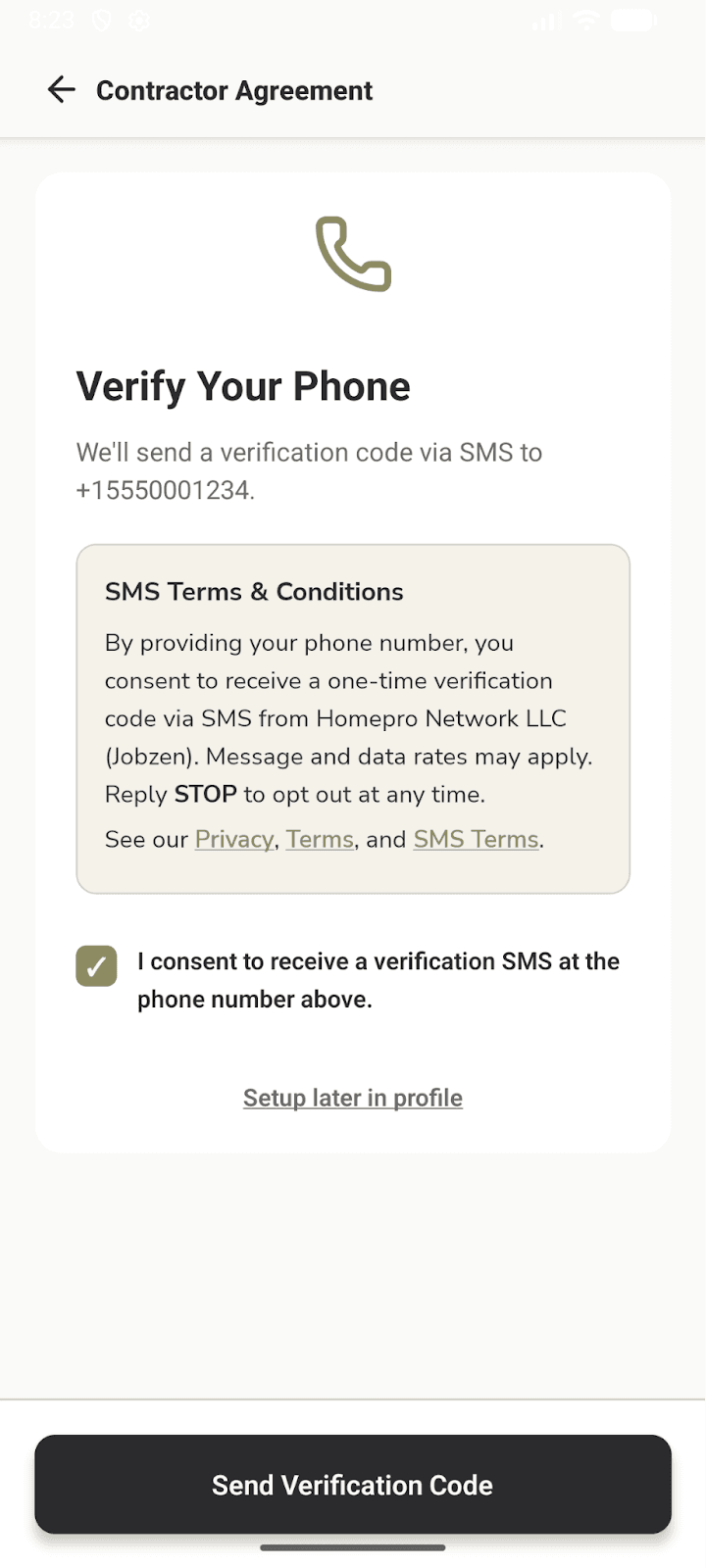
Immediately after the Contractor Agreement is submitted, the app presents the “Verify Your Phone” screen. This is where SMS consent is collected.
This screen displays:
The contractor’s entered phone number (e.g., “We’ll send a verification code via SMS to +15550001234”)
A prominent SMS Terms & Conditions box with the full consent language
An optional standalone checkbox: “I consent to receive a verification SMS at the phone number above”
A “Setup later in profile” link — allowing the contractor to skip SMS and configure it later in their account settings
A “Send Verification Code” button, which is only activated after the checkbox is checked
Consent Language Displayed (verbatim, as shown on screen) — Flow A.3:
SMS Terms & Conditions — displayed on the Verify Your Phone screen
By providing your phone number, you consent to receive a one-time verification code via SMS from
Homepro Network LLC (Jobzen). Message and data rates may apply. Reply STOP to opt out at any time.
See our Privacy, Terms, and SMS Terms.
Opt-In Mechanism (Optional):
Standalone Opt-In Checkbox (optional — user must affirmatively check to receive SMS)
☑ I consent to receive a verification SMS at the phone number above.
OR: “Setup later in profile” — user may skip SMS and configure it later in profile settings.
The contractor opts in by:
Reviewing the SMS Terms & Conditions box displayed on screen
Affirmatively checking the standalone consent checkbox
Tapping “Send Verification Code” — this action sends the OTP and constitutes express SMS consent
If the contractor does not check the checkbox, they tap “Setup later in profile” and no SMS is sent. They can enable SMS authentication at any time from their profile settings.
After tapping “Continue,” the contractor is taken to the “Contractor Agreement” screen. Here they review the full contractor agreement terms and provide their electronic signature by typing their full legal name. They then tap “Agree.”
SMS consent is not collected at this step. This is the agreement to Jobzen’s contractor terms. The SMS opt-in screen follows immediately after in Flow A.3.
Flow A.3 — Verify Your Phone: Optional SMS Opt-In
Immediately after the Contractor Agreement is submitted, the app presents the “Verify Your Phone” screen. This is where SMS consent is collected.
This screen displays:
The contractor’s entered phone number (e.g., “We’ll send a verification code via SMS to +15550001234”)
A prominent SMS Terms & Conditions box with the full consent language
An optional standalone checkbox: “I consent to receive a verification SMS at the phone number above”
A “Setup later in profile” link — allowing the contractor to skip SMS and configure it later in their account settings
A “Send Verification Code” button, which is only activated after the checkbox is checked
Consent Language Displayed (verbatim, as shown on screen) — Flow A.3:
SMS Terms & Conditions — displayed on the Verify Your Phone screen
By providing your phone number, you consent to receive a one-time verification code via SMS from
Homepro Network LLC (Jobzen). Message and data rates may apply. Reply STOP to opt out at any time.
See our Privacy, Terms, and SMS Terms.
Opt-In Mechanism (Optional):
Standalone Opt-In Checkbox (optional — user must affirmatively check to receive SMS)
☑ I consent to receive a verification SMS at the phone number above.
OR: “Setup later in profile” — user may skip SMS and configure it later in profile settings.
The contractor opts in by:
Reviewing the SMS Terms & Conditions box displayed on screen
Affirmatively checking the standalone consent checkbox
Tapping “Send Verification Code” — this action sends the OTP and constitutes express SMS consent
If the contractor does not check the checkbox, they tap “Setup later in profile” and no SMS is sent. They can enable SMS authentication at any time from their profile settings.
Flow B.1 — Contractor Profile: Phone Verification (Post-Onboarding)
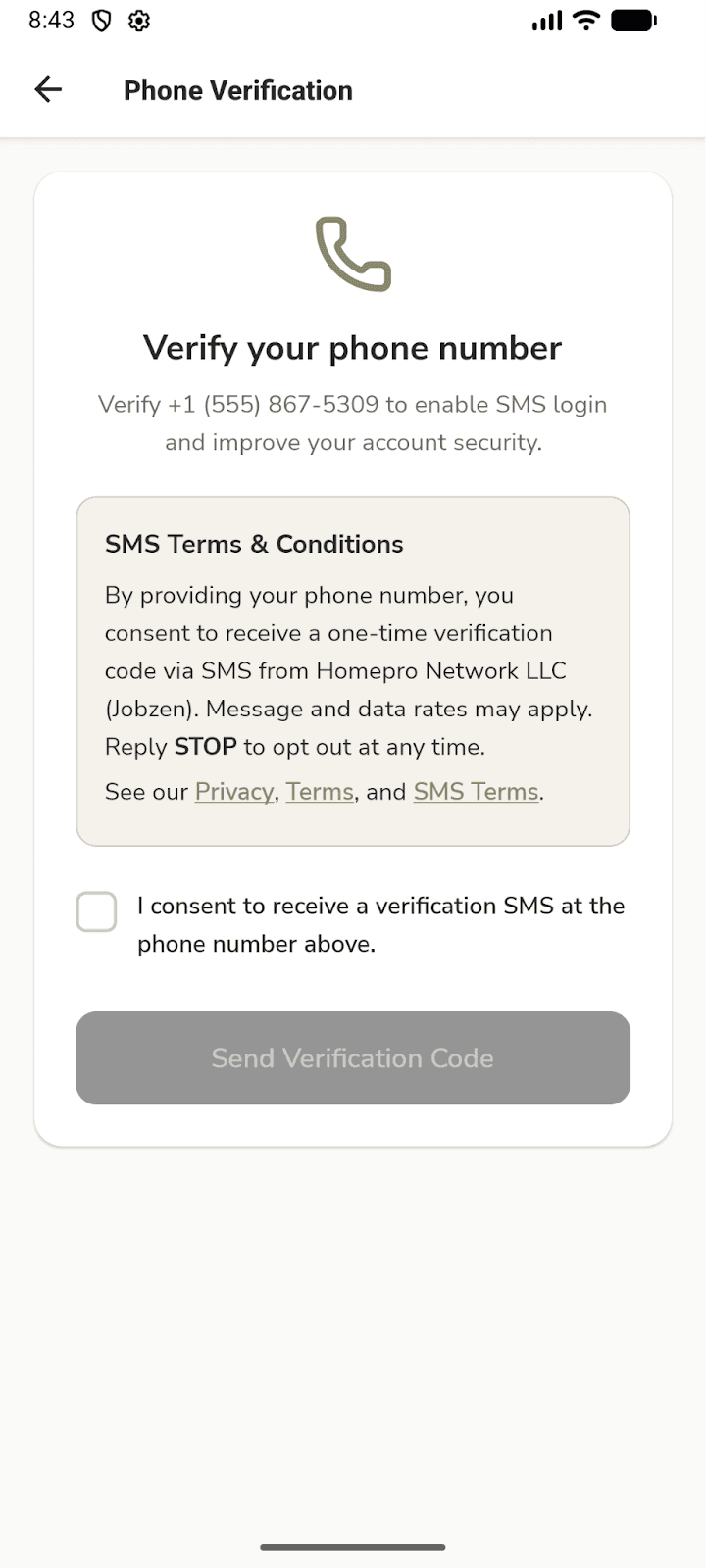
This is the second location where SMS consent may be collected. It is presented to contractors who completed onboarding via Flow A but chose to skip SMS opt-in at that time. After onboarding is complete, the contractor may navigate to their profile settings and initiate phone verification from there, which presents an identical “Verify Your Phone” screen.
This screen displays:
The contractor’s entered phone number (e.g., “We’ll send a verification code via SMS to +15550001234”)
A prominent SMS Terms & Conditions box with the full consent language
A standalone checkbox: “I consent to receive a verification SMS at the phone number above”
A “Send Verification Code” button, which is only activated after the checkbox is checked
Consent Language Displayed (verbatim, as shown on screen) — Flow B.1:
Note: The SMS Terms & Conditions language displayed is identical to Flow A.3.
SMS Terms & Conditions — displayed on the Verify Your Phone screen
By providing your phone number, you consent to receive a one-time verification code via SMS from Homepro Network LLC (Jobzen). Message and data rates may apply. Reply STOP to opt out at any time.
See our Privacy, Terms, and SMS Terms.
Opt-In Mechanism:
Standalone Opt-In Checkbox (user must affirmatively check to receive SMS)
☑ I consent to receive a verification SMS at the phone number above.
The contractor opts in by:
Reviewing the SMS Terms & Conditions box displayed on screen
Affirmatively checking the standalone consent checkbox
Tapping “Send Verification Code” — this action sends the OTP and constitutes express SMS consent
They can enable or re-enable SMS authentication at any time from their profile settings.
This is the second location where SMS consent may be collected. It is presented to contractors who completed onboarding via Flow A but chose to skip SMS opt-in at that time. After onboarding is complete, the contractor may navigate to their profile settings and initiate phone verification from there, which presents an identical “Verify Your Phone” screen.
This screen displays:
The contractor’s entered phone number (e.g., “We’ll send a verification code via SMS to +15550001234”)
A prominent SMS Terms & Conditions box with the full consent language
A standalone checkbox: “I consent to receive a verification SMS at the phone number above”
A “Send Verification Code” button, which is only activated after the checkbox is checked
Consent Language Displayed (verbatim, as shown on screen) — Flow B.1:
Note: The SMS Terms & Conditions language displayed is identical to Flow A.3.
SMS Terms & Conditions — displayed on the Verify Your Phone screen
By providing your phone number, you consent to receive a one-time verification code via SMS from Homepro Network LLC (Jobzen). Message and data rates may apply. Reply STOP to opt out at any time.
See our Privacy, Terms, and SMS Terms.
Opt-In Mechanism:
Standalone Opt-In Checkbox (user must affirmatively check to receive SMS)
☑ I consent to receive a verification SMS at the phone number above.
The contractor opts in by:
Reviewing the SMS Terms & Conditions box displayed on screen
Affirmatively checking the standalone consent checkbox
Tapping “Send Verification Code” — this action sends the OTP and constitutes express SMS consent
They can enable or re-enable SMS authentication at any time from their profile settings.
A2P 10DLC CTA Disclosure Compliance
The consent language in both flows satisfies the following A2P 10DLC CTA disclosure requirements:
Brand identification: “Homepro Network LLC (Jobzen)”
Nature of messages: “one-time verification code via SMS”
Message and data rates disclosure: “Message and data rates may apply”
Opt-out instructions: “Reply STOP to opt out at any time”
Links to Privacy Policy, Terms of Service, and SMS Terms
Additionally, the checkbox is standalone and independent from the Contractor Agreement acceptance in both flows
The consent language in both flows satisfies the following A2P 10DLC CTA disclosure requirements:
Brand identification: “Homepro Network LLC (Jobzen)”
Nature of messages: “one-time verification code via SMS”
Message and data rates disclosure: “Message and data rates may apply”
Opt-out instructions: “Reply STOP to opt out at any time”
Links to Privacy Policy, Terms of Service, and SMS Terms
Additionally, the checkbox is standalone and independent from the Contractor Agreement acceptance in both flows
Message Frequency
Message frequency varies based on each contractor’s individual actions. Contractors who opt in typically receive 1–5 messages per week, triggered only by their own authentication actions (see also Section 1). Onboarding completion prompts are transactional and sent only once per incomplete step. Jobzen does not send scheduled batch, promotional, or marketing SMS messages.
Message frequency varies based on each contractor’s individual actions. Contractors who opt in typically receive 1–5 messages per week, triggered only by their own authentication actions (see also Section 1). Onboarding completion prompts are transactional and sent only once per incomplete step. Jobzen does not send scheduled batch, promotional, or marketing SMS messages.
Sample Messages
The following are representative examples of SMS messages sent by Jobzen:
Sample Message 1 — Contractor Phone Verification (OTP)
Your Jobzen verification code is 847291. Enter this code to verify your phone number and activate your contractor account. Code expires in 10 minutes. Reply STOP to opt out.
Sample Message 2 — Login Authentication (OTP)
Jobzen: Your one-time login code is 563874. This code expires in 10 minutes. Do not share this code. Reply STOP to stop receiving messages.
Sample Message 3 — Onboarding Completion Prompt
Hi, it’s Jobzen! Your contractor profile is almost complete. Finish your setup to start receiving job requests: www.gojobzen.com/profile. Reply STOP to opt out.
Sample Message 4 — Phone Re-verification
Jobzen verification: 291047. Use this code to re-verify your phone number. Msg & data rates may apply. Reply STOP to opt out, HELP for help.
The following are representative examples of SMS messages sent by Jobzen:
Sample Message 1 — Contractor Phone Verification (OTP)
Your Jobzen verification code is 847291. Enter this code to verify your phone number and activate your contractor account. Code expires in 10 minutes. Reply STOP to opt out.
Sample Message 2 — Login Authentication (OTP)
Jobzen: Your one-time login code is 563874. This code expires in 10 minutes. Do not share this code. Reply STOP to stop receiving messages.
Sample Message 3 — Onboarding Completion Prompt
Hi, it’s Jobzen! Your contractor profile is almost complete. Finish your setup to start receiving job requests: www.gojobzen.com/profile. Reply STOP to opt out.
Sample Message 4 — Phone Re-verification
Jobzen verification: 291047. Use this code to re-verify your phone number. Msg & data rates may apply. Reply STOP to opt out, HELP for help.
Opt-Out Instructions
Users can stop receiving SMS messages from Jobzen at any time using any of the following methods:
Text STOP (or STOPALL, UNSUBSCRIBE, CANCEL, END, or QUIT) in reply to any Jobzen SMS
In the app: Settings → Account → Authentication Method → Switch to Email
Deleting the Jobzen account stops all future messages
Note on OPTOUT and REVOKE: The keywords OPTOUT and REVOKE are not handled automatically by Twilio. If support for these keywords is required, they must be configured as custom keyword responses in the Twilio messaging service.
STOP Confirmation Response: You have successfully been unsubscribed from Jobzen SMS messages. You will not receive any more messages from this number. Reply START to resubscribe.
Note on START: The START resubscription keyword must be explicitly configured in the Twilio messaging service.
HELP Response:
Jobzen: For help with SMS, visit www.gojobzen.com or email support@gojobzen.com.
Reply STOP to opt out.
Note: Opting out of SMS switches the user to email authentication. SMS can be re-enabled at any time in profile settings or by replying START.
Users can stop receiving SMS messages from Jobzen at any time using any of the following methods:
Text STOP (or STOPALL, UNSUBSCRIBE, CANCEL, END, or QUIT) in reply to any Jobzen SMS
In the app: Settings → Account → Authentication Method → Switch to Email
Deleting the Jobzen account stops all future messages
Note on OPTOUT and REVOKE: The keywords OPTOUT and REVOKE are not handled automatically by Twilio. If support for these keywords is required, they must be configured as custom keyword responses in the Twilio messaging service.
STOP Confirmation Response: You have successfully been unsubscribed from Jobzen SMS messages. You will not receive any more messages from this number. Reply START to resubscribe.
Note on START: The START resubscription keyword must be explicitly configured in the Twilio messaging service.
HELP Response:
Jobzen: For help with SMS, visit www.gojobzen.com or email support@gojobzen.com.
Reply STOP to opt out.
Note: Opting out of SMS switches the user to email authentication. SMS can be re-enabled at any time in profile settings or by replying START.
Privacy Policy & Data Sharing
Jobzen’s Privacy Policy is published at: www.gojobzen.com/privacy
CTIA-Required Privacy Language (included in Jobzen’s Privacy Policy)
Jobzen collects phone numbers solely for account authentication and transactional onboarding purposes. We do not sell, rent, or share your phone number or SMS opt-in consent data with any third party for marketing or promotional purposes.
All data categories described in this Privacy Policy exclude text messaging originator opt-in data and consent; this information will not be shared with any third parties or affiliates for marketing or promotional purposes.
Your phone number is shared only with Twilio, Inc. as the technical SMS delivery provider, solely for the purpose of sending authentication and transactional messages.
Jobzen’s Privacy Policy is published at: www.gojobzen.com/privacy
CTIA-Required Privacy Language (included in Jobzen’s Privacy Policy)
Jobzen collects phone numbers solely for account authentication and transactional onboarding purposes. We do not sell, rent, or share your phone number or SMS opt-in consent data with any third party for marketing or promotional purposes.
All data categories described in this Privacy Policy exclude text messaging originator opt-in data and consent; this information will not be shared with any third parties or affiliates for marketing or promotional purposes.
Your phone number is shared only with Twilio, Inc. as the technical SMS delivery provider, solely for the purpose of sending authentication and transactional messages.
Terms of Service
Jobzen’s Terms of Service are published at: www.gojobzen.com/terms
Jobzen’s SMS Terms are published at: www.gojobzen.com/sms-terms
SMS consent is collected separately and independently from the general Terms of Service acceptance. The standalone checkbox in Flow A.3 (and Flow B.1 for post-onboarding opt-in) is the sole SMS consent mechanism — it is never pre-checked and never bundled into any other agreement.
Jobzen’s Terms of Service are published at: www.gojobzen.com/terms
Jobzen’s SMS Terms are published at: www.gojobzen.com/sms-terms
SMS consent is collected separately and independently from the general Terms of Service acceptance. The standalone checkbox in Flow A.3 (and Flow B.1 for post-onboarding opt-in) is the sole SMS consent mechanism — it is never pre-checked and never bundled into any other agreement.
Supported Carriers
Jobzen SMS works with all major US carriers including AT&T, Verizon, T-Mobile, and most regional and MVNO carriers. Standard message and data rates may apply per the user’s carrier plan.
Jobzen SMS works with all major US carriers including AT&T, Verizon, T-Mobile, and most regional and MVNO carriers. Standard message and data rates may apply per the user’s carrier plan.
Help & Support
Technical support: support@gojobzen.com
Website: www.gojobzen.com
SMS settings: In-app → Settings → Account → Authentication Method
Technical support: support@gojobzen.com
Website: www.gojobzen.com
SMS settings: In-app → Settings → Account → Authentication Method
Legal Entity & Contact Information
Legal Name: Homepro Network LLC, d/b/a Jobzen
Website: www.gojobzen.com
Support Email: support@gojobzen.com
Appendix: Twilio A2P 10DLC Campaign Registration Reference
Ready-to-paste content for the Twilio campaign registration form:
Campaign Description
Jobzen sends transactional SMS messages to contractors who have explicitly and optionally opted in to SMS during onboarding. Messages include one-time password (OTP) verification codes and onboarding completion prompts for users who began registration but did not finish. Opt-in is never required — contractors may skip SMS and use email authentication instead. No marketing or promotional messages are sent.
Message Flow / Call to Action
(Paste into Twilio’s “Message Flow” field)
Jobzen collects optional SMS consent through a single three-step contractor onboarding journey:
Step 1 — Contractor Registration Form: The contractor completes a registration form (Step 1 of 3, labeled “Fast account activation”) that collects their name, email, phone number, and address. They tap “Continue.” No SMS consent is collected at this step.
Step 2 — Contractor Agreement: The contractor reviews and signs the Jobzen Contractor Agreement with an electronic signature. They tap “Agree.” No SMS consent at this step.
Step 3 — Verify Your Phone (optional SMS opt-in): Immediately after the Agreement, the app shows a “Verify Your Phone” screen. The contractor’s phone number is displayed. An SMS Terms & Conditions box shows verbatim: “By providing your phone number, you consent to receive a one-time verification code via SMS from Homepro Network LLC (Jobzen). Message and data rates may apply.
Reply STOP to opt out at any time. See our Privacy, Terms, and SMS Terms.” The contractor must affirmatively check a standalone checkbox — “I consent to receive a verification SMS at the phone number above” — to enable SMS. A “Setup later in profile” option is always available to skip SMS entirely. Tapping “Send Verification Code” (only available after checkbox is checked) constitutes express consent and triggers the OTP.
Opt-in is optional, standalone from the Contractor Agreement, never pre-checked, and not a condition of using Jobzen. Email authentication is always available.
Msg frequency varies (1–5/week). Msg & data rates may apply. Reply STOP to opt out, HELP for help.
Privacy: www.gojobzen.com/privacy | Terms: www.gojobzen.com/terms | SMS Terms: www.gojobzen.com/sms-terms
